Mathesar 0.12.0
Summary
Mathesar 0.12.0 focuses on deployment and administration improvements. This release adds Azure Blob Storage support for file attachments and imported data files, health check endpoints for containerized deployments, and more configuration options for public entry and login pages.
It also disables Django’s built-in admin interface by default, improves the login and SSO experience, fixes several issues affecting anonymous routes and Azure-hosted PostgreSQL databases, and includes documentation, translation, and maintenance updates.
This page provides a comprehensive list of all changes in the release.
Improvements
Azure Blob Storage support
Mathesar can now use Azure Blob Storage for file columns. Administrators can configure a file backend with protocol: az in file_storage.yml or FILE_STORAGE_DICT. For file-column storage, the Azure backend supports managed identity and workload identity through DefaultAzureCredential, as well as account keys, SAS tokens, connection strings, and service principals.
Imported data files can also be stored in Azure Blob Storage by setting DATA_FILES_STORAGE_BACKEND=azure and configuring the Azure storage account and container. The data-file Azure backend authenticates through DefaultAzureCredential. Data-file imports now read through Django’s storage API instead of assuming a local file path, and Mathesar stores the detected file encoding with each imported data file.
See the file storage backend documentation and environment variable documentation for configuration details.
Customizable public entry and login pages
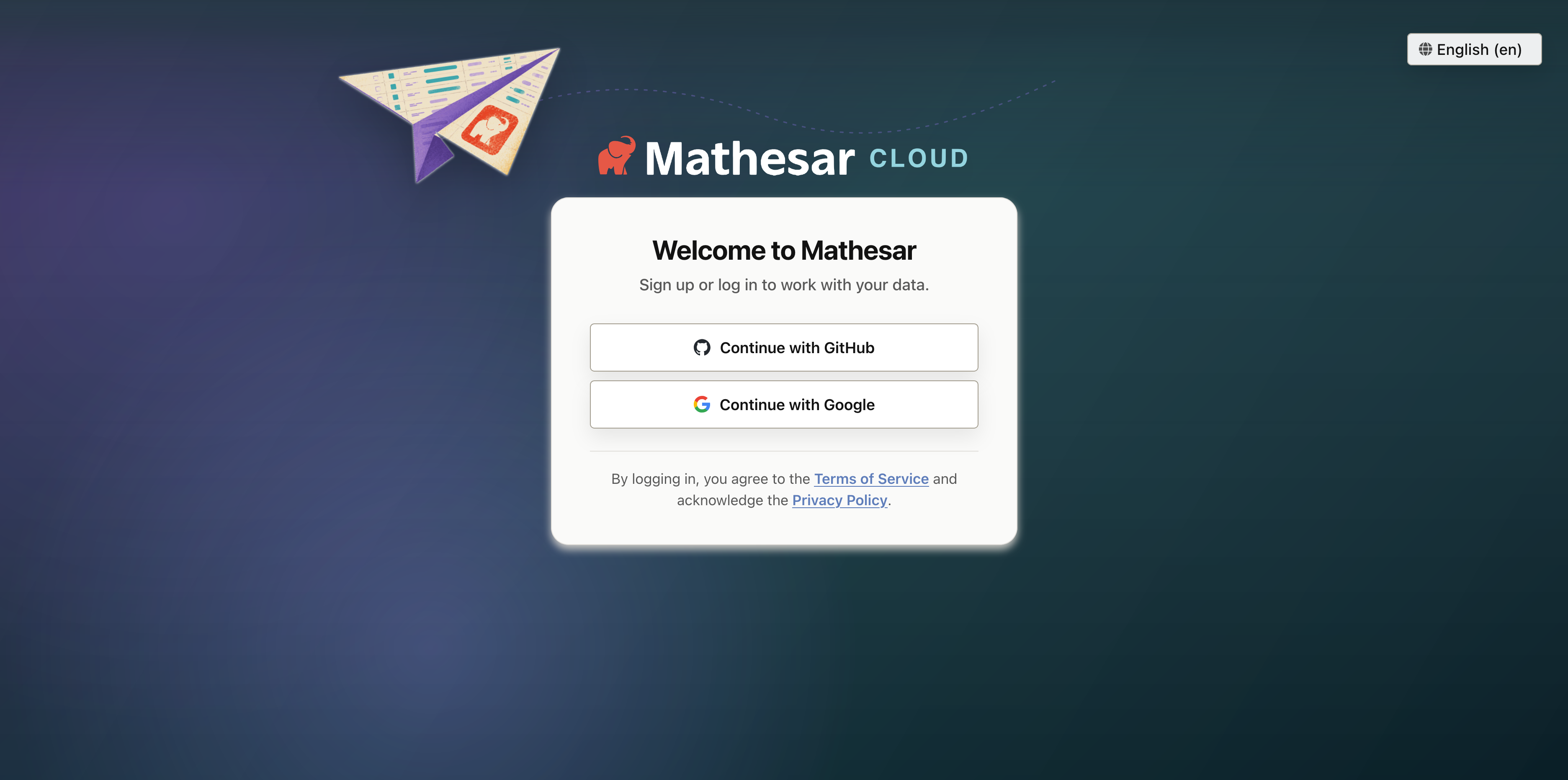
The login page can now show custom branding, localized copy, SSO options, and legal links.
Administrators now have more control over Mathesar’s public-facing experience. Anonymous visitors who open / can be redirected to a custom URL with MATHESAR_LANDING_PAGE_URL, which is useful for hosted deployments with a separate marketing or onboarding page.
The login page now supports a custom instance name, logo, localized heading and body copy, background, and Terms of Service and Privacy Policy links. Custom login text can be configured in login_page.yml or through MATHESAR_LOGIN_PAGE_TEXT_DICT, including per-language overrides.
The login page has also been visually refreshed, SSO buttons now use clearer copy, and contextual header gradients have been refined.
See the public entry and login page configuration documentation for configuration details.
Related work: #5301, #5312, #5316, #5317, #5318, #5319
Django admin disabled by default
Django’s built-in admin interface at /admin/ is now disabled by default. This does not affect Mathesar’s own administration pages under /administration/. Administrators who still need Django admin can re-enable it by setting MATHESAR_DJANGO_ADMIN_ENABLED=true.
Related work: #5316
Health check endpoints
Mathesar now serves dedicated health check endpoints for deployment platforms and container orchestrators:
/healthz/live/returns a liveness response without touching the database./healthz/ready/checks database connectivity and returns503if Mathesar is not ready to serve traffic.
These endpoints are handled before host validation, SSL redirects, and authentication. The default Docker Compose health check now uses the readiness endpoint.
Related work: #5291
Minimal production Docker stage
The Dockerfile now includes a minimal production stage for deployments that do not need the bundled PostgreSQL server. This stage is intended for people building their own Mathesar image. It collects static assets at build time, runs as an unprivileged mathesar user, and starts Mathesar without the inbuilt database fallback.
Related work: #5286
Bug fixes
- Fix permission errors when provisioning user-owned databases on Azure-hosted PostgreSQL. Mathesar now grants
CREATEon the target database’spublicschema from the root role #5284, #5296, #5302, #5305 - Fix anonymous route common-data handling so unauthenticated users no longer trigger authorized data lookups while rendering anonymous pages or 404 responses #5311
- Fix blank 404 pages in the frontend router #5314
- Fix the GitHub SSO logo path on the login page #5304
Documentation
- Fix typos in user guide documentation #5309
- Update the Azure storage note in the 0.11.0 release notes #5294
- Update Spanish, French, and Japanese translations #5320, #5322, #5323
Maintenance
- Add default logging to stderr #5313
- Add the Mathesar Cloud website to label sync #5297
- Merge the 0.11.0 release branch into develop #5293
- Merge 0.11.0 release note updates #5295
- Set the default Gunicorn timeout to 180 seconds
Upgrading to 0.12.0
PostgreSQL 13 and Python 3.9 no longer supported
Mathesar 0.8.0 ended official support for PostgreSQL 13 and Python 3.9. Please upgrade to PostgreSQL 14+ and Python 3.10+ before upgrading to Mathesar 0.12.0.
Usernames are limited to 63 characters
Mathesar 0.11.0 stores usernames with a 63-character limit. Before upgrading from a version older than 0.11.0, ensure no existing Mathesar users have usernames longer than 63 characters.
Django admin is disabled by default
If you use Django’s built-in /admin/ interface, set MATHESAR_DJANGO_ADMIN_ENABLED=true before upgrading. Mathesar’s own administration pages under /administration/ are unaffected.
For installations using Docker Compose
If you have a Docker compose installation, run the command below:
Your installation directory may be different
You may need to change /etc/mathesar/ in the command above if you chose to install Mathesar to a different directory.
For direct installations of Mathesar on Linux, macOS, or WSL
Mathesar provides an install script that automates both fresh installs and upgrades for standalone (non-Docker) installations.
Follow the steps below to upgrade Mathesar:
-
Enter your installation directory into the box below and press Enter to personalize this guide:
- Do not include a trailing slash.
- Do not use any variables like
$HOME.
-
Go to your Mathesar installation directory.
Note
Your installation directory may be different from above if you used a different directory when installing Mathesar.
-
Download and run the install script for 0.12.0
-
Replace your gunicorn systemd service with a Mathesar systemd service
-
Disable and stop the existing gunicorn service
-
Follow the steps in Run Mathesar as a systemd service from the installation guide
-
Remove the gunicorn service file
-
-
Update your Caddyfile
-
Use the configuration shown in Install and configure Caddy in the installation guide, and update your Caddyfile accordingly
-
Ensure that your domains are specified directly in the first line of the Caddyfile
-
Restart your Caddy service
-